

You want the best locks for your home in 2026. These locks help protect your family and belongings. Traditional locks provide strong physical safety, while smart locks offer convenience with advanced digital features. Home security is no longer just about a robust deadbolt; it now encompasses front door security that mitigates digital threats like data breaches. Brands like SAWHERO demonstrate how the best locks for home can be user-friendly and exceptionally secure.
Choose a lock that aligns with your lifestyle and ensures your home remains safe both inside and out.
Key Takeaways
-
Pick Grade 1 locks for your front door. These locks give the best safety from break-ins.
-
Smart locks are easy to use. They let you unlock doors from far away. They can also show you who comes in and out. Pick smart lock brands that care about safety.
-
Always update your smart lock’s firmware. Use strong passwords to keep your lock safe from data breaches.
-
Think about what your home needs. Pick locks that match how you live, like regular or smart locks.
-
Learn about new security risks. Pick locks that keep you safe both in real life and online.
What Are the Best Locks for Home in 2026?
Top Traditional Lock Picks
You want locks that keep your home safe. Traditional locks are still a good choice for front doors. They are easy to use and work well. Police and experts say you should pick locks with high security ratings. Here are the lock grades:
|
Lock Grade |
Description |
Security Level |
|---|---|---|
|
Grade 1 |
Best for front and back doors. |
Best |
|
Grade 2 |
Good for busy areas. |
Better |
|
Grade 3 |
Good for inside rooms. |
Good |
Grade 1 locks are best for main doors. Brands like Abus Granit, Kwikset, Yale, and Schlage are strong and hard to break. The Schlage B60N is tough against cutting and prying. Locksmiths like Schlage because it is very safe. Deadbolts, mortise locks, and padlocks are all good choices. You can add extra parts to make your door even safer.

Tip: Always look for Grade 1 when picking a front door lock.
Best Smart Locks for Home
Smart door locks are popular because they are easy and have cool features. You can open your door with a fingerprint, code, app, or key. The best smart locks for 2026 are:
-
SAWHERO A1 Smart Security Door Lock
-
August Smart Lock
-
Eufy Smart Lock
-
Kwikset Smart Lock
-
Schlage Smart Lock
-
Yale Smart Lock
The August Wi-Fi Smart Lock lets you use an app or key. It works with Alexa and Google Assistant. Many people think it is a great deal. The Ultraloq U-Bolt Pro Wi-Fi is a good fingerprint lock with many ways to open it. SAWHERO A1 has a duress alarm, auto-lock, fake passcode, and is easy to put on your door. Smart locks help you let in family, guests, or workers. You can also see who comes in your house.
Note: Smart locks are even better when you use them with extra door parts.
Why These Locks Lead the Market
You want locks that are safe and simple to use. The best locks for home are popular because they are strong and have features you need. Traditional locks like Schlage and Yale are hard to break and get top safety scores. Smart locks like SAWHERO A1 and August let you open your door from far away and use an app. Police and people trust these brands because they work well and pass hard tests.
Pick locks that fit what you want. For front doors, use Grade 1 locks and add extra parts. For smart features, choose smart locks with apps and good digital safety. Locks with fingerprints give you more safety. You can make your home safer with smart locks that are a good deal and protect your family.
Actionable Advice: Use both traditional locks and smart locks with extra door parts for the safest home in 2026.
How Do the Best Locks for Home Compare?

Traditional vs. Smart Lock Features
You might wonder how these locks are different. Traditional locks use keys you hold in your hand. They have simple parts inside. Smart locks use codes, fingerprints, and phone apps. You can open a smart lock from far away. You can see who comes into your house. Smart locks let you give codes to guests or workers. With traditional locks, you must be there and have your key.
|
Feature |
Smart Locks |
Traditional Locks |
|---|---|---|
|
Multiple methods |
Physical key only |
|
|
Remote Access |
From anywhere |
Must be present |
|
Activity Tracking |
Full logs |
None |
|
Temporary Codes |
Unlimited |
Require key copies |
|
Security System Integration |
Full automation |
None |
|
Insurance Discounts |
Often eligible |
Rarely |
Tip: Smart locks give you more ways to control your door. Traditional locks are simple and work well.
Security Ratings and Ease of Use
You want a lock that is easy and safe. Smart locks often get high safety scores. August locks get 9.4 out of 10. Yale locks get 9.1. Schlage locks get 9.0. These brands are strong and easy to put on your door. Smart locks let you change who can get in with your phone. If you lose a key for a traditional lock, you need a new key.
|
Brand |
SecureScore™ |
Description |
|---|---|---|
|
August |
9.4 / 10 |
Smart, affordable, strong, works with other devices |
|
Yale |
9.1 / 10 |
Good quality, modern touch screen |
|
Schlage |
9.0 / 10 |
Looks nice, easy to use, simple to install |
-
Traditional locks: Easy to use, always work, no batteries needed.
-
Smart locks: No keys, open from anywhere, easy to manage.
Actionable Advice: Pick a lock that matches your life. Smart locks are good for busy homes and rentals. Traditional locks are good if you want something simple and easy.
What Is a Data Breach?

Data Breach Explained
A data breach happens when someone gets into private information without permission. This can happen if hackers break into computers or if someone shares information by mistake. Experts say a data breach means secret data is seen by people who should not see it. This could be your name, address, passwords, or smart device details. If your personal information is lost or shared without your okay, it is a data breach. Laws say that any time someone gets electronic information without permission, it counts as a data breach.
Tip: Use strong passwords and keep your devices updated to stay safer.
Impact on Smart Locks
Smart locks make life easier and safer. But smart locks connect to the internet, so they can face digital threats. Data breaches in smart home devices, like smart locks, are happening more often now. Some companies care more about making things easy than about strong security. Hackers have broken into smart locks by finding weak spots, like bad encryption or unprotected cloud storage. When a data breach happens, hackers can unlock doors, see who comes and goes, or break into homes and offices. This puts your privacy and safety in danger.
-
Hackers have used data breaches to open smart locks in hotels and offices.
-
Some breaches let strangers watch through home cameras.
-
Your home security needs strong locks and good digital protection.
Actionable Advice: Pick smart locks from brands that care about security. Look for features like encryption and regular updates.
How to Choose the Best Lock for Your Home?
Key Security Features
Your home needs strong security features to stay safe. Look for locks with things like fingerprint scanning and phone connection. Some locks can work with your home security system. These features make it easy and safe to get inside without a key. Pick locks that meet rules like BS 3621 or ANSI/BHMA Grade 1. These rules mean the lock is hard to break and lasts a long time. Many people want locks that are tough and can be used from far away. Some smart locks are easy to use, but you should check if they get updates. Always think about both safety and how easy it is to use the lock.
Tip: Choose locks that use new technology and are also strong to stop burglars.
Compatibility and User Needs
You need to see if the lock fits your door and what you want. Every home is different and has its own needs. Use this table to help you pick:
|
Term |
Description |
|---|---|
|
Door thickness |
Make sure the lock fits your door’s thickness. |
|
Clearance from gate |
Check the space between your door and gate so nothing gets in the way. |
|
Clearance from door edge |
Measure from the door’s edge to the lock for a good fit. |
|
Clearance for height |
Make sure there is enough room above and below for the lock. |
|
Door closer |
Think about using a tool that shuts the door by itself for better safety. |
|
Bolt assembly |
Use normal sizes so the lock is easy to put in and works well. |
Think about how many people will use the lock. Decide if you want things like opening the door from far away or seeing who comes in.
Data Breach Resistance
Smart locks should keep your data safe. Look for locks that have proof they can stop data breaches. These can be ANSI/BHMA Grade 1, UL 2050, or NIST rules. Labs like UL Cybersecurity and ISED test locks to find weak spots. They check if the lock uses good encryption and stops tampering. This testing helps protect your home from hackers. Pick locks that pass these tests and get updates often.
Actionable Advice: Check lock certifications and test results before you buy. This helps you stay away from weak locks and keeps your home safe.
What Are the Best Smart Locks for 2026?
SAWHERO A1 Smart Lock Review
You want a smart lock that keeps your home safe and is simple to use. The SAWHERO A1 has cool features like a duress alarm and auto-lock. It also has a long virtual passcode with 24 digits. You can open your door with a fingerprint, code, app, or key. The Wi-Fi lets you control the lock from anywhere. The app helps you add people and see who comes in. You only need a screwdriver to put it on your door. It fits most doors, so renters, families, and travelers can use it. Silent SOS alerts and strong security help you feel safe.
Tip: Pick a lock that is both safe and easy to use every day.
Other Top Smart Lock Brands
There are many smart locks to pick from in 2026. The best brands work well with smart homes and keep you safe. Here are some top choices:
-
Nest x Yale: No key needed, sends alerts, works with smart homes.
-
Schlage Encode Plus: Has Wi-Fi, Grade 1 safety, good for strong doors.
-
Lockly Visage Zeno: Uses your face to unlock, has two cameras, hands-free.
-
Eufy Video Smart Lock S330: Has a video doorbell, lets you see and unlock.
-
August Wi-Fi Smart Lock: Lets you open the door from far away, easy to set up, good value.
|
Grade |
Description |
Examples |
|---|---|---|
|
Grade 1 |
Lasts 250,000 uses, holds 360 pounds of force. |
Schlage Encode Plus, Deadbolt+ |
|
Grade 2 |
Lasts 150,000 uses, holds 250 pounds of force. |
Yale Assure Lock 2, August Lock |
|
Grade 3 |
Lasts 100,000 uses, holds 150 pounds of force. |
N/A |
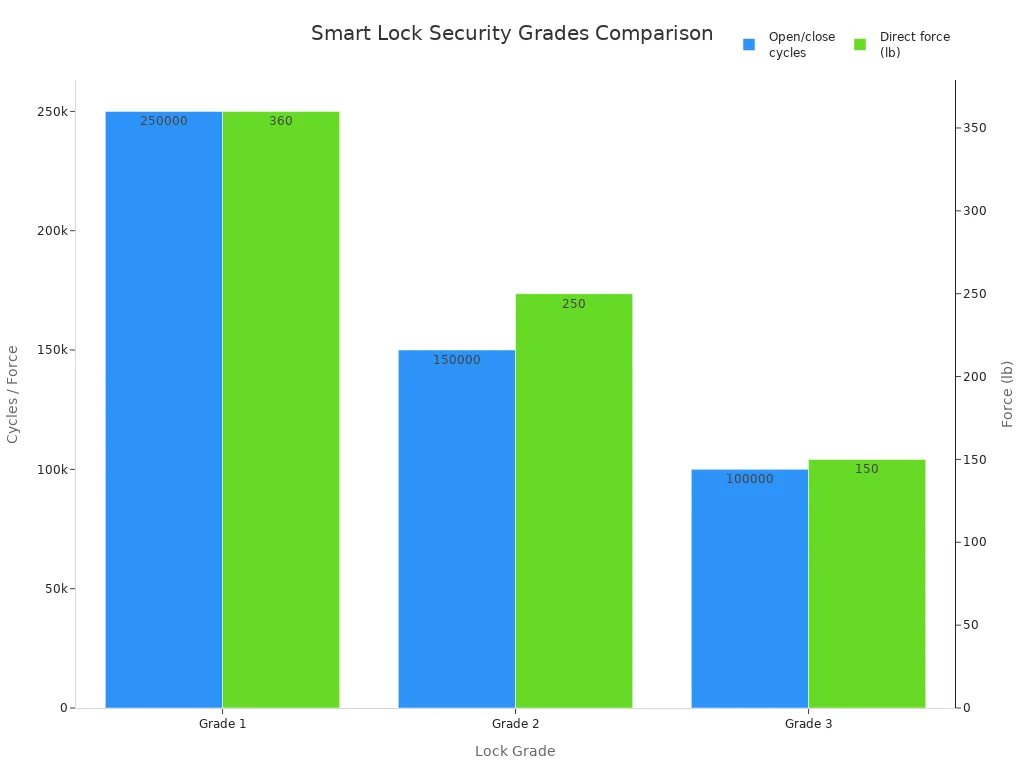
Note: Grade 1 locks give your home the best protection.
Security and User Experience
You want a lock that feels safe and is easy to use. The SAWHERO A1 is easy to set up and has quiet alerts. Other locks like Yale Assure Lock SL and Level Lock+ Connect are also good. They work well with smart homes and are easy to use. Most people like how fast they can install these locks and how strong they are. The table shows the main features and who should use each lock.
|
Model |
Key Features |
Best For |
Pros |
Cons |
|---|---|---|---|---|
|
SAWHERO A1 |
Alarm, Wi-Fi, fingerprint, app |
Renters, travelers |
Easy setup, silent alerts, strong |
Needs batteries |
|
Ultraloq Bolt |
Keyless, tough, small |
Travelers |
Fast install, strong |
Not many smart features |
|
Level Lock+ Connect |
Matter, auto-unlock |
Smart homes |
Works with smart homes, looks nice |
Costs more |
|
Rently Smart Bolt Elite |
Codes, alarm |
Hosts, travelers |
Easy check-in, alerts |
Needs app setup |
|
Yale Assure Lock SL |
Long battery, alarm, no key |
Homeowners, renters |
Reliable, advanced access |
A bit bigger |
Actionable Advice: Choose a smart lock that fits what you need and keeps you safe. Make sure it is easy to use and works with your smart home.
Traditional vs. Smart Locks: Which Is Safer?
Pros and Cons of Traditional Locks
You want your home to be safe. Traditional locks use simple parts inside. You turn a key to open the door. These locks do not need batteries or Wi-Fi. They work every time you use them. It is easy to put them on your door. You do not have to worry about hackers or losing power.
|
Evidence |
Description |
|---|---|
|
Mechanical Operation |
They use simple parts that make a strong barrier. |
|
Independence |
They do not need power, so they always work. |
|
Reliability |
They are simple and always work when you need them. |
|
Security Barrier |
Good deadbolts stop people from getting in. |
|
Cyber Threat Immunity |
Hackers cannot break these locks with computers. |
|
Key Access |
If you have the key, you can open the door. |
|
Installation |
They are easy to put on and take care of. |
Tip: Keep your keys in a safe spot. Check your lock every year for damage.
Pros and Cons of Smart Locks
Smart locks give you new ways to keep your home safe. You can use a code, fingerprint, or app to unlock the door. You can see who comes in and let guests in for a short time. Smart locks connect to your phone and other devices. You can control them even when you are not home. Some smart locks have alarms and keep a list of who enters.
|
Advantages |
Disadvantages |
|---|---|
|
Hackers or system problems can cause trouble. |
|
|
Enhanced home security features |
Power loss can make some locks stop working. |
|
Ability to grant temporary access |
They cost more than regular locks. |
|
Integration with smart home systems |
Some people worry about their privacy. |
|
Remote access and activity monitoring |
They need batteries or electricity to work. |
|
Customizable access codes |
You might need help to install them. |
Note: Update your smart lock’s software often. Use strong passwords for your app.
Data Breach Risks Compared
Smart locks use the internet to work. Hackers can try to steal your information. You need to stop data breaches to keep your home safe. Many people want to know how their data is used. You can set privacy rules and tell companies not to sell your data.
|
Statistic |
Percentage |
|---|---|
|
Need to avoid data breaches |
|
|
Importance of clear data usage information |
21% |
|
Customer-configurable privacy settings |
17% |
|
Refraining from selling information |
15% |
Actionable Advice: Pick smart locks with good privacy settings. Read the privacy policy before you buy.
How to Prevent Data Breaches with Smart Locks?

Security Best Practices
You can keep your smart lock safe by doing easy things. Pick locks from brands you trust that use strong encryption. Lockly uses many layers of encryption to protect your data. Always look at how companies use your data and pick locks that only collect what is needed. Make sure your Wi-Fi uses WPA3 encryption. Turn on two-factor authentication if your lock lets you. Check who can use your lock and look at permissions often.
-
Use strong and different passwords for your lock.
-
Turn on two-factor authentication.
-
Update your lock’s firmware often.
-
Keep your Wi-Fi network safe.
-
Watch who can use your lock and change permissions.
-
Use extra safety steps for your door.
-
Buy locks from good companies.
-
Learn how your data is used.
-
Try to share less data.
Tip: Pick smart locks that tell you clearly how they use your data.
Passwords and Updates
Strong passwords help keep your smart lock safe. Make your password hard to guess and do not use it anywhere else. Change your password every few months. Update your lock’s firmware when the company gives you a new update. Many people check for updates every three to six months. Put in important security updates right away. Updates fix weak spots and make your lock safer.
-
Change your passwords often.
-
Update your lock’s firmware as soon as you can.
-
Check for updates every three to six months.
-
Install important patches right away.
Note: Updates and strong passwords make it harder for hackers to get in.
Monitoring and Alerts
Smart locks can warn you if something is wrong. AI systems watch for strange things and send alerts to your phone. You get a message if you forget to lock the door or if someone tries to break in. Access logs show who comes in and goes out. Special sensors can lock all doors if someone tries to get in.
-
Get alerts right away if someone tries to get in and fails.
-
Get messages if you leave the door unlocked.
-
Logs show who enters and leaves.
-
AI systems watch movement and send live video.
Actionable Advice: Turn on alerts and check your logs often to keep your home safe. 🛡️
You have lots of good choices for home locks in 2026. Traditional locks like Schlage and Yale are strong and keep you safe. Smart locks like SAWHERO A1 have cool features and are simple to use. Data security is just as important as having a tough lock. Pick locks that are easy to use and also protect you well. To stay safe and know what is happening:
-
Check news from groups like the Electronic Frontier Foundation.
-
Look for new rules about smart lock privacy.
-
Think about what your home needs to stay safe.
-
Look for things like auto-lock and backup keys.
-
Ask security experts for help that matches your home.
Watch out for new online dangers and choose locks that protect your family.
FAQ

What is the difference between a Grade 1 and Grade 2 lock?
Grade 1 locks are the safest for your front door. They last longer and are harder to break than Grade 2 locks. Experts like the American National Standards Institute say Grade 1 is best for main doors. Pick Grade 1 if you want the most protection.
Can smart locks work if the power goes out?
Most smart locks use batteries, not your home’s power. If the power goes out, you can still open your door with a key or backup code. Consumer Reports says battery-powered locks keep working during blackouts. Check your lock’s battery often so it always works.
How do I know if my smart lock is safe from hackers?
Pick locks that use strong encryption and get updates often. Brands that follow ANSI/BHMA or NIST rules are safer online. Security experts say to turn on two-factor authentication. Always update your lock’s app and firmware to keep it safe.
Do smart locks fit all doors?
Not every smart lock will fit every door. Measure your door’s thickness and check what the lock needs before you buy. Most brands tell you what door sizes work. The Builders Hardware Manufacturers Association says to check the fit before you install. Use a screwdriver to test if you are not sure.
What should I do if I forget my smart lock code?
You can reset your code with the lock’s app or another way. Many locks let you use a key or fingerprint if you forget. The maker’s instructions show you how to get your code back. Keep your backup key in a safe spot for emergencies.


